
Furthacomms - Aircall + Simpro Integration
Connect Aircall to Simpro so your team sees Simpro job and customer info on every call and every call is logged back into Simpro.
Description
Furthacomms – Aircall + Simpro Integration
Connect Aircall to Simpro so your team sees Simpro job and customer context on every call, and every call is automatically logged back into Simpro.
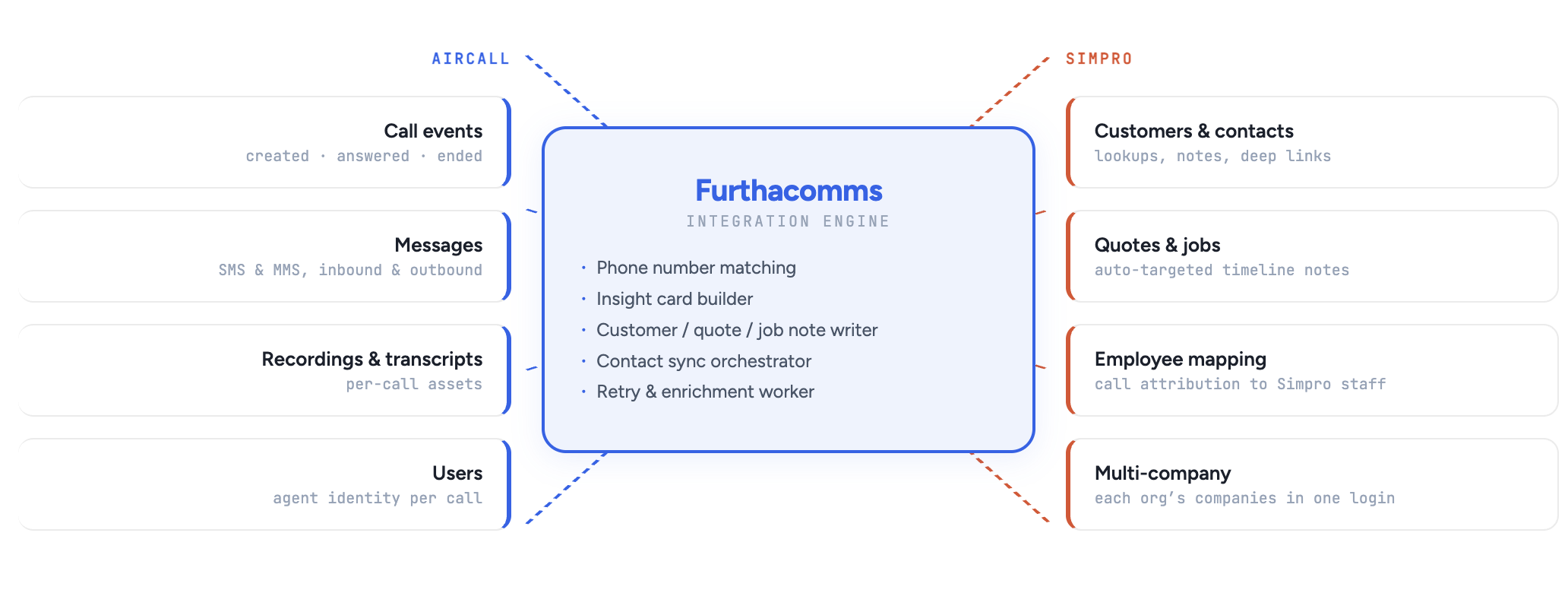
Agents get real-time insight cards in Aircall showing jobs, quotes, invoices and customer details from Simpro, no switching apps. Completed calls (and optional SMS/MMS) are logged to the correct Simpro customer notes with transcript and recording link, so the full conversation history stays in Simpro. Contacts sync from Simpro to Aircall for accurate caller recognition, and Aircall users can be mapped to Simpro employees so call attribution is correct. The result: one place for field and phone activity, better customer conversations, and nothing lost between systems.
Features
See Simpro context on every call
Jobs, quotes, invoices and customer details from Simpro appear in Aircall when a call comes in, so agents have the right info without opening Simpro.
Calls and messages logged into Simpro
Completed calls (and optional SMS/MMS) are automatically added to the correct Simpro customer notes with transcript and recording link, so the full history lives in Simpro.
Simpro contacts in Aircall
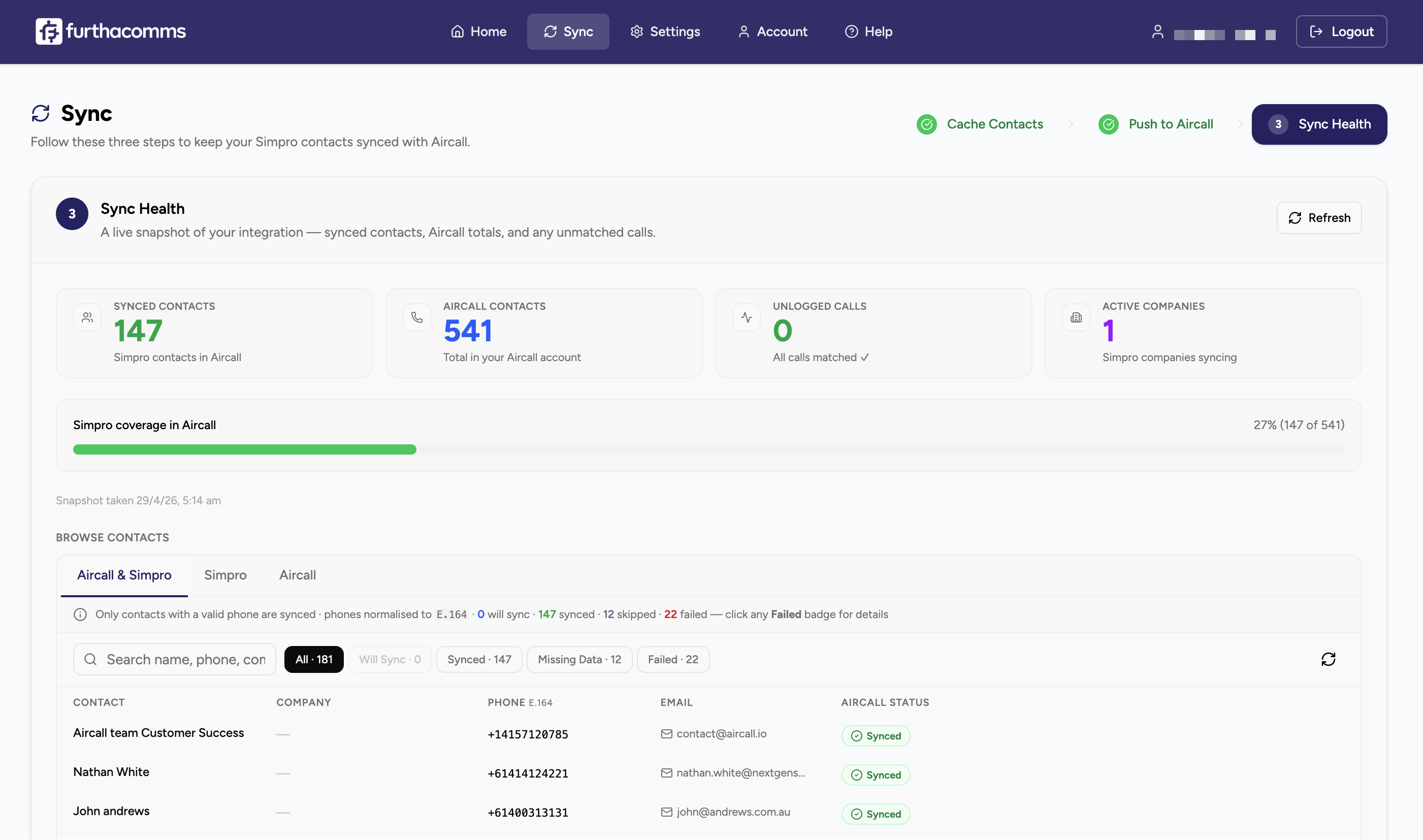
Contacts sync from Simpro to Aircall so callers are recognised and insight cards show the right customer and site.
Correct attribution in Simpro
Map Aircall users to Simpro employees so every logged call is attributed to the right person in Simpro.
One place for field and phone activity
Customer and job data from Simpro is available in Aircall, and all call and message activity is recorded in Simpro, so field and phone teams stay aligned.
Media
Integration Diagrams
Contact
Contact
Customer
Aircall Insight Card
Customer Note
Call
Quote Note
Call
Customer Note
SMS / MMS Message
Reviews
Pricing
Furthacomms Professional Tier
$5.00Per User
Price is for each user per Month (Exclusive of existing/required Simpro & Aircall Licences/Subscriptions).
- Live Simpro caller insights on Aircall as calls come in & Two-way sync between Simpro and Aircall.
* The pricing here is for display purposes only. You should contact the partner for the most up to date and correct pricing information. We do not take any responsibility for this pricing information, which is provided by our partners. Pricing last updated: 28 Apr, 2026 12:00AM
Resources
FAQ
To use Furthacomms you need an active Simpro subscription and an active Aircall subscription. Public API and webhook access, which is what our integration uses, is included on every Aircall plan (Essentials, Professional, and Custom), so there's no higher tier required just to connect it.
A few things worth knowing before you commit:
- Aircall minimum seats: Essentials and Professional both require a minimum of 3 licences.
- Call transcripts and AI summaries in Simpro notes require Aircall's AI Assist add-on (call recording must also be enabled on the number).
- SMS / MMS logging requires Aircall's SMS feature, which is included on all plans but only available for domestic numbers in the US, Canada, UK, Australia, France, and Germany.
- Call recording links in Simpro notes require recording to be enabled on the Aircall number.
If you're unsure which Aircall plan is right for your workflow, get in touch - we'll help you map your requirements to the right tier.
Every data transfer happens over TLS-encrypted HTTPS, and we authenticate to both Aircall and Simpro using OAuth 2.0 — we never store or see your passwords. Aircall and Simpro refresh tokens are encrypted at rest in our database.
We also:
- Only request the minimum Aircall API scope required to do the job (public_api), and only the Simpro permissions needed to read customers/contacts/quotes/jobs and write notes.
- Sign all Aircall webhooks with an HMAC-based token so we can verify every event genuinely came from your Aircall tenant.
- Host the application on Heroku, with Redis and Postgres backed up daily.
- Keep an isolated data partition per Simpro organisation - your customer data is never visible to another tenant.
- Do not sell, share, or use your call data for model training. Transcripts and recordings remain under your Aircall account; we only read them to attach them to the matching Simpro note.
You can revoke access at any time from the Aircall or Simpro admin consoles and all stored tokens become immediately invalid.
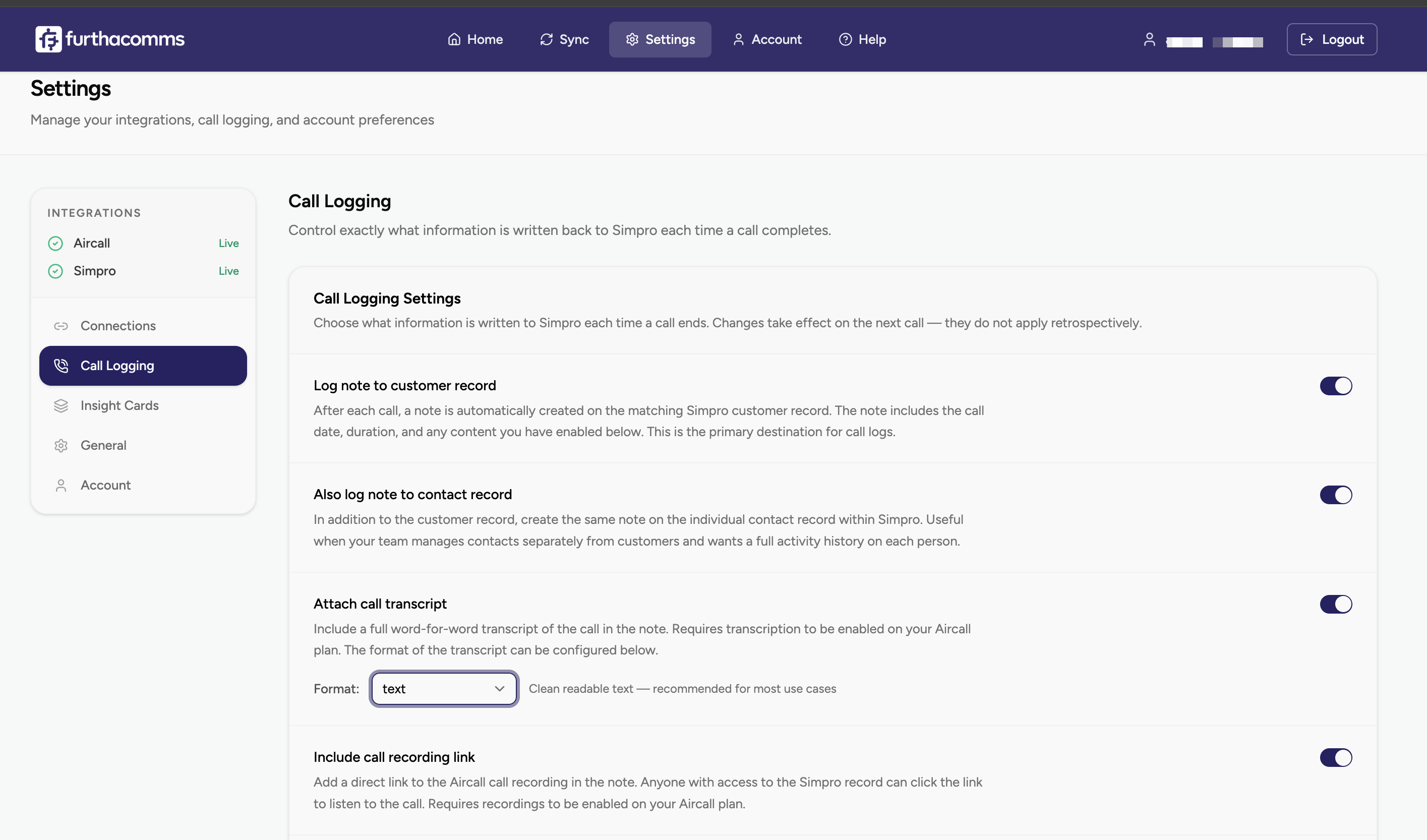
When a call ends, Furthacomms matches the phone number to a Simpro customer and writes a formatted HTML note on that customer's record containing:
- Call direction (inbound or outbound) and duration
- Date and time of the call
- The Aircall agent who handled the call, mapped to the matching Simpro employee (so the note is assigned correctly)
- The Aircall contact name (falling back to the Simpro contact name, then the customer name)
- A "Play Recording" link back to Aircall (if recording is enabled on that number)
- Aircall tags and call comments added by the agent
- The full transcript (if AI Assist is active), rendered either as plain text or as a styled chat-bubble transcript, depending on your setting
- The AI summary of the conversation at the bottom (If Aircall AI Plan is Available/Enabled).
Optionally, the same note can also land on the customer's top open quote or job timeline so field-service context isn't split between records.
Yes. When a caller is matched to a Simpro customer, the integration can automatically find that customer's most relevant open quote and / or most relevant open job and also log the call there. You can pick the selection rule per target with either most recently modified or most recently created - and you can toggle each target on or off independently.
What we currently support:
- Notes on the Simpro customer record — always available when call logging is on
- Notes on the top open quote — optional
- Notes on the top open job — optional
Site, invoice and contact-level notes are on our roadmap but not yet in production. If a caller can't be matched to a Simpro customer at all, the call is parked in an Unlogged Calls queue for your admin to review and retry.
When an Aircall event fires, Furthacomms runs the caller's number through a pre-built Simpro phone index (refreshed in the background) and, if that misses, falls back to a live Simpro API lookup against customers and contacts. It handles phone-number format variations — for example AU numbers stored as 0400 000 000 and +61 400 000 000 are treated as the same number.
If the number still doesn't match anyone:
- The Insight Card shows a graceful "unknown caller" state — it doesn't block the agent.
- The call is placed in the Unlogged Calls queue in the admin console.
- Once you fix the number in Simpro (e.g. add it to a customer), you can one-click retry from the queue and the call will be logged retroactively without needing to re-create it in Aircall.
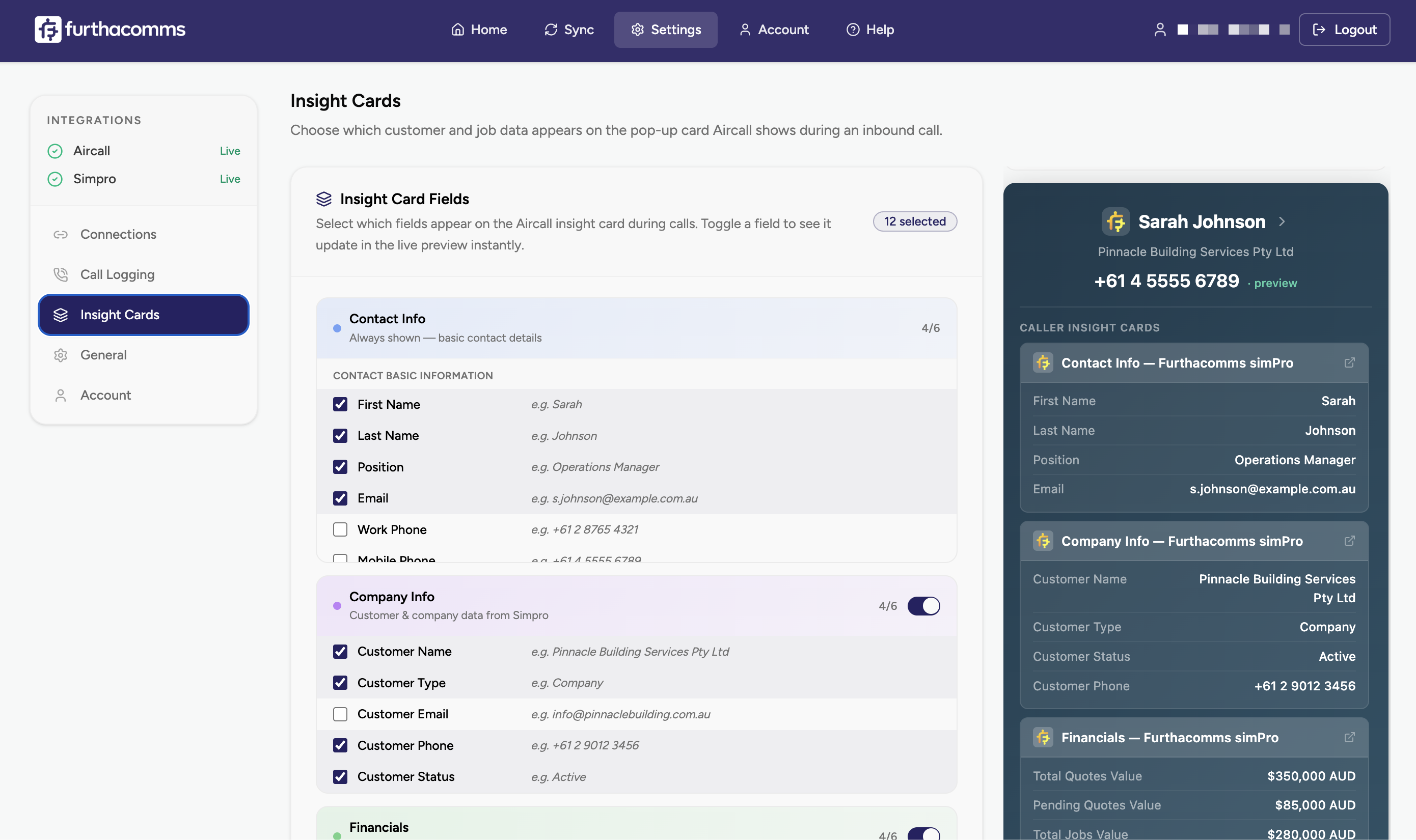
The Insight Card appears in the agent's Aircall screen as soon as the call is created, before they answer, and stays visible throughout the call. It pulls live context from Simpro so agents have the right info in front of them.
Out of the box, cards can surface:
- Customer / company name, phone, email, address
- Primary site the caller is likely calling about
- Open quotes (number, stage, value) and open jobs (number, stage, status)
- Recent financial context from Simpro
- A deep link that opens the exact customer record in Simpro in one click
Card content is configurable from the Furthacomms settings panel - you pick the fields and card groups you want, and you can preview the result before saving.
Simpro to Aircall, yes. The integration batch-creates Aircall contacts from your indexed Simpro customer and contact records (any record with a phone number). This means your agents see Simpro-sourced names on the Aircall softphone when a known customer calls, and they can click-to-dial Simpro contacts directly from Aircall.
Aircall to Simpro, no. We deliberately do not create new customers or contacts in Simpro from Aircall caller data - unmatched calls go to the Unlogged Calls queue instead of silently creating duplicates in your Simpro database.
Contact sync runs as a background job with automatic retries and duplicate detection (422 / 409 responses from Aircall are treated as "already exists").
Yes - both inbound and outbound SMS and MMS sent through Aircall can be logged to the matching customer's record in Simpro. Messages show the direction, sender/recipient, message body, and links to any attached media.
Two things to be aware of:
- Aircall's SMS / MMS capability is only available for domestic numbers in the US, Canada, UK, Australia, France, and Germany. If your Aircall number is in a country Aircall doesn't support for SMS, message logging simply won't apply.
- Messages are currently only logged to the customer record, not to quote or job timelines. This keeps SMS histories in one predictable place rather than scattered across multiple Simpro objects.
SMS / MMS logging is off by default and enabled with a single toggle in the settings.
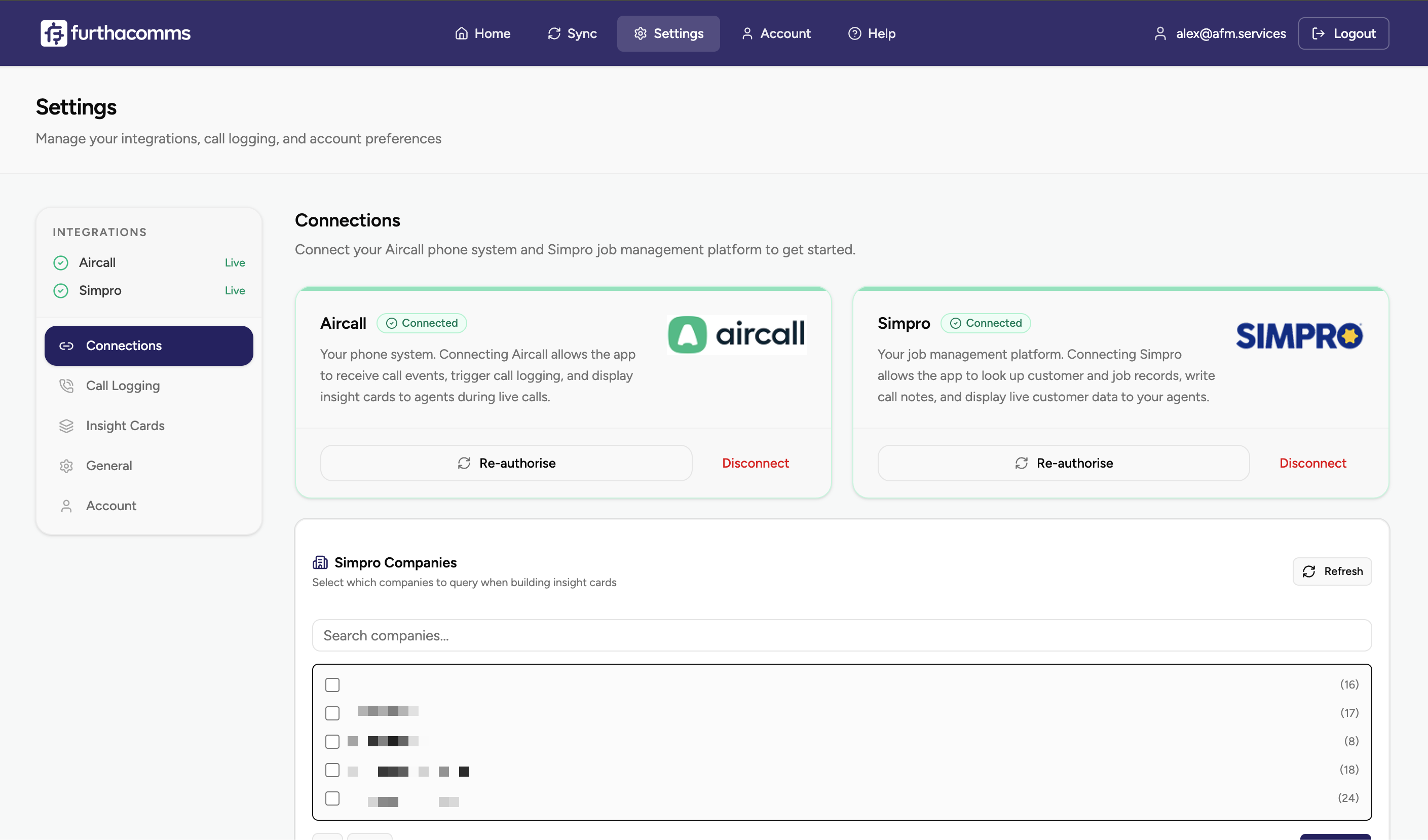
Yes. Furthacomms is built around Simpro's multi-company structure. After you connect Simpro, you'll see every company (build) attached to your Simpro login, and you pick which ones should participate in call logging and contact sync. You can leave test builds out entirely.
When a call comes in, Furthacomms checks every selected company for a matching customer, so if the same phone number exists across two builds, both customer records get the call logged. This is useful for field-service groups that run separate Simpro companies for different trades or regions under the same ownership.
Each Furthacomms org is fully isolated: tokens, contact caches, and call logs never cross tenant boundaries.
What happens when something fails - Simpro is down, a transcript isn't ready, an agent missed a tag?
Everything is designed to fail gracefully so agents never see errors from the integration:
- Redis or database temporarily unavailable: Furthacomms returns a retryable response to Aircall so the webhook is re-delivered automatically. No events are dropped.
- Simpro API error or rate-limit: The call is placed in the Unlogged Calls queue and can be retried from the admin console in one click.
- Transcript or AI summary not ready at hang-up: A background worker retries with exponential backoff (up to three attempts over ~10 minutes) and patches the existing Simpro note when the transcript arrives - no duplicate notes.
- Phone number not matched to any Simpro customer: Call is queued as "Unlogged" with the reason attached. Fix the number in Simpro, click retry, and it logs.
- Contact push to Aircall fails: The record is stored in a FailedSync table and surfaced on the contacts dashboard so your admin can see exactly which contacts didn't make it across.
Your admin has a single-pane view of unlogged calls, failed contact syncs, and sync progress - there's no hidden state to debug.